

Enabling HTTP Mode
Set theMCP_TRANSPORT environment variable:
Configuration
Authentication Modes
The server supports three authentication modes for HTTP transport:Required Mode (default, most secure)
/auth flow with per-user DB credentials:
- Users must authenticate via POST
/authwith their IBM i credentials - Each user gets their own database connection with their permissions
- Tokens expire based on
MCP_TOKEN_EXPIRY
Token Mode (simpler integration)
- All requests use the same Bearer token
- Database connection uses
DB2I_*environment variables - No per-user authentication
None Mode (trusted networks only)
/mcpendpoints are accessible without any authentication- Database connection uses
DB2I_*environment variables /authendpoint returns 404
MCP_ALLOW_UNAUTHENTICATED_HTTP=true.
Requests whose Host header is not loopback and not listed in MCP_ALLOWED_HOSTS are rejected with 403. Set MCP_ALLOWED_HOSTS to the name clients use when the server is published beyond localhost.
In required mode, the host field on POST /auth must be DB2I_HOSTNAME or a name in MCP_AUTH_ALLOWED_DB_HOSTS. Other hosts are rejected before a connection is opened.
Authentication Flow (Required Mode)
HTTP mode uses token-based authentication. You must first obtain a token by posting credentials, then use that token for subsequent MCP requests.Step 1: Get a Token
Post credentials to/auth:
Step 2: Use the Token
Include the token in theAuthorization header for MCP requests:
Auth Request Fields
Multiple Systems
WithDB2I_PROFILES set, a login in required mode picks a system:
test profile. The username and password come from the request, and the server tests them on that system before it returns a token. The token is bound to that system:
- Tools on that token have no
systemargument, and every call runs ontest. - Business SQL tools fixed to another system with
system:are not listed. - To use another system, log in again with its name.
host, port, and database are refused while DB2I_PROFILES is set, because the profile supplies them. When MCP_AUTH_ALLOWED_DB_HOSTS is unset, /auth may connect only to the profile hosts. When it is set, a profile whose host is not in the list cannot be used.
In token and none modes there is no login, so every caller can reach every profile, and each call picks one with the system argument. Each caller runs as the profile’s configured user.
Remote Clients (OAuth)
Remote MCP clients, such as claude.ai custom connectors, cannot send a static header or callPOST /auth. They follow the MCP authorization spec instead. With MCP_OAUTH_ENABLED=true, the server acts as its own OAuth 2.1 authorization server:
- The client calls
/mcp, gets401withWWW-Authenticate: Bearer resource_metadata="...", and reads the protected resource and authorization server metadata. - It registers itself at
/oauth/register(dynamic client registration). - The user’s browser opens
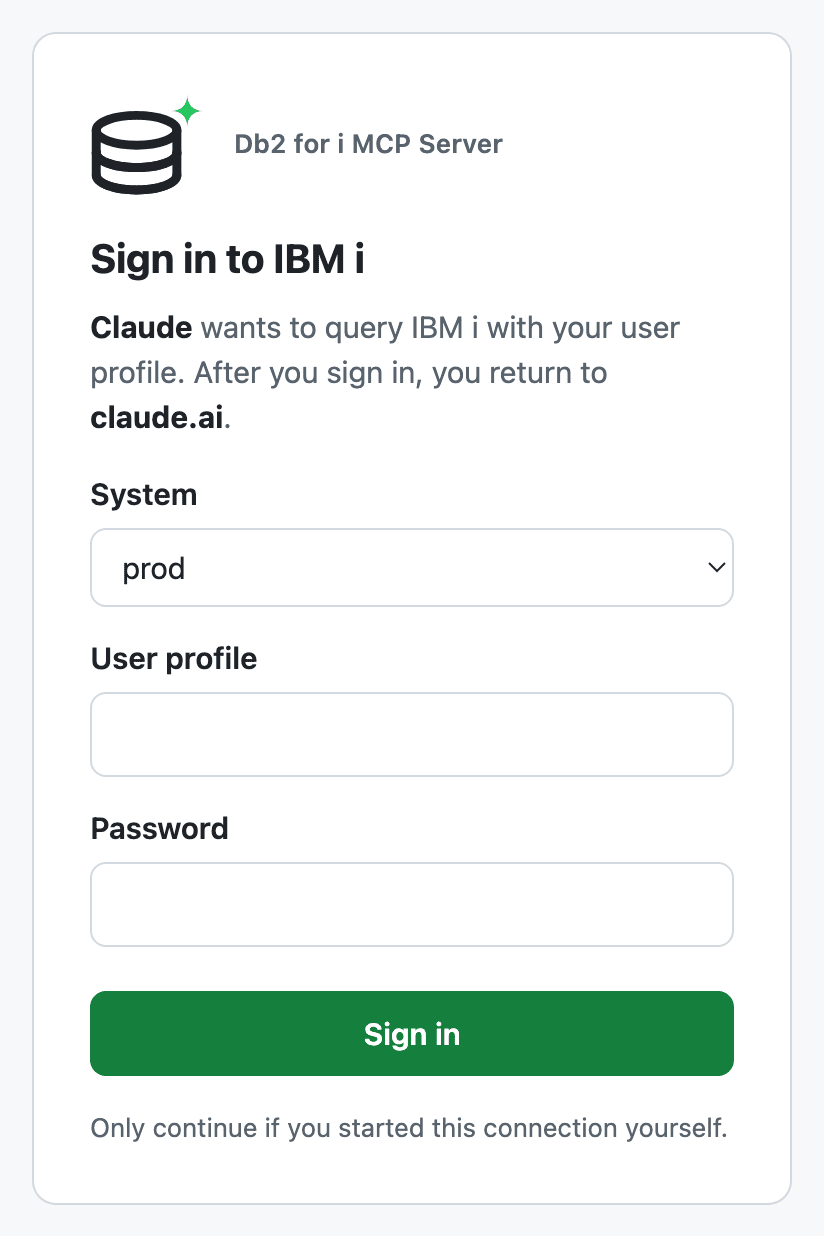
/oauth/authorize: a sign-in page for an IBM i user profile and password, with a system picker whenDB2I_PROFILESlists more than one. - The server checks the credentials with a test connection, like
/auth, and redirects back with a one-time code. - The client exchanges the code, with its PKCE verifier, at
/oauth/tokenfor an access token and a refresh token.
/auth returns. It is bound to the user’s credentials and the chosen system, so every query runs with that user’s own IBM i authority, under the schema allowlist of that profile.
MCP_PUBLIC_URL, through a reverse proxy or a tunnel that keeps the Host header. MCP_PUBLIC_URL must be an origin only: serve the server at the root of its hostname, not under a path.
To add it in Claude, open Settings > Connectors > Add custom connector and enter https://mcp.example.com/mcp. Choose Sign in now and Register automatically, and leave the request headers empty. When you connect, the sign-in page opens:
- Cursor. In
~/.cursor/mcp.json(or a project’s.cursor/mcp.json), add the URL only, with no command, environment or password:Cursor opens the sign-in page in the browser and returns throughcursor://anysphere.cursor-mcp/oauth/callback, which is allowed by default. - Claude Code.
claude mcp add --transport http --scope user db2i https://mcp.example.com/mcp, then sign in from/mcp. Claude Code uses a loopback callback, which is always accepted.
MCP_OAUTH_STATE_FILE.
Staying signed in across restarts
SetMCP_OAUTH_STATE_FILE to a file path, and set MCP_OAUTH_SECRET. The server then writes refresh grants to that file and reads them back when it starts, so a restart or a new Docker image does not sign anyone out:
- Access tokens still end with the process. The client gets a 401, uses its refresh token, and carries on without showing the sign-in page.
- Each grant holds the user’s IBM i password, because a refresh opens a new connection. Entries are encrypted with AES-256-GCM under a key derived from
MCP_OAUTH_SECRET. The file never holds a refresh token, only its hash. - On start, each grant is rebuilt from the current profiles. A grant for a removed system, or a host that is no longer allowed, is dropped.
- A new
MCP_OAUTH_SECRETmakes the file unreadable: the server logs a warning, and users sign in again. - The file is written with mode
0600, in a directory with mode0700. If a write fails, the server logs an error and keeps working, but that grant does not survive a restart.
/data/oauth for it:
MCP_OAUTH_SECRET can read the stored passwords. Keep them apart where you can, for example the secret in a Docker secret and the file on a volume only the container mounts, and leave them out of backups that other people can read.
Limiting who can reach the server
OAuth decides who may query, but the sign-in page and token endpoint still face the internet. Put an IP allowlist in front of them as well. Claude connectors call from Anthropic’s published outbound range,160.79.104.0/21. The sign-in page opens in the user’s own browser, so the networks your users sign in from must be allowed too.
With an ngrok tunnel, a traffic policy on the endpoint does this before requests reach the server:
allow and deny rules.
Notes:
- Redirect URIs. Registration is refused for a redirect URI outside
MCP_OAUTH_REDIRECT_URIS, which defaults to the claude.ai and claude.com connector callbacks and Cursor’scursor://anysphere.cursor-mcp/oauth/callback. Setting it replaces the defaults, so list those you still need. Loopback redirects (http://localhost:<port>/...) are always accepted, for desktop clients. Without this list, anyone could register a client that sends codes to their own site and ask a user to sign in. - Registrations are stateless. A client ID is the client’s metadata signed with
MCP_OAUTH_SECRET. Nothing is stored, and a registration keeps working after a restart as long as the secret stays the same. Without the secret, a random one is used and clients must register again after a restart. - Codes live in memory, refresh tokens too unless
MCP_OAUTH_STATE_FILEis set. Without the file, a restart signs every user out. Refresh tokens rotate on every use, and each refresh repeats the test connection, so a disabled user profile or a changed password ends the grant. If the IBM i cannot be reached, the refresh answers 503 and the grant stays. Revoking an access or refresh token ends both. - Rate limit. Sign-in attempts share the
/authlimit: 5 per minute per client IP by default (AUTH_RATE_LIMIT_MAX_ATTEMPTS,AUTH_RATE_LIMIT_WINDOW_MS). All/oauth/*endpoints together allow 120 requests per minute per IP by default (OAUTH_RATE_LIMIT_MAX_REQUESTS,OAUTH_RATE_LIMIT_WINDOW_MS). Behind a proxy, setMCP_TRUST_PROXYso the limits use the client address fromX-Forwarded-For. Without it, all users share the proxy’s budget. A successful sign-in does not count toward the limit. - Scopes are not used. A token can call every tool that
MCP_TOOLS_ENABLEDandMCP_TOOLS_DISABLEDleave registered.
API Endpoints
*Authentication depends on
MCP_AUTH_MODE:
required: Bearer token from/author from the OAuth flowtoken: Static Bearer token fromMCP_AUTH_TOKENnone: No authentication required
/openapi.json into Postman, Insomnia, or other API clients for interactive exploration.
Protocol versions
HTTP serves two protocol eras from the same/mcp endpoint:
- 2026-07-28 (current). No
initializehandshake and noMcp-Session-Id. Each request carries a_metaenvelope (io.modelcontextprotocol/protocolVersion, client info, capabilities) plusMCP-Protocol-Version,Mcp-Method, and (for named calls)Mcp-Name.server/discoverreplacesinitialize. - 2025-era (through 2025-11-25). Stateless by default: each
initialize/tools/callis its own request.GETandDELETE /mcpanswer405.
token / none mode), so dropping protocol sessions does not mix users’ IBM i credentials.
Session Modes
Stateless (default)
Each HTTP request builds a fresh MCP server on the caller’s existing database pool. This is the mode 2026-07-28 clients use, and it also serves 2025-era clients withoutMcp-Session-Id.
Stateful (deprecated)
SetMCP_SESSION_MODE=stateful only when a 2025-era client requires Mcp-Session-Id, GET /mcp, or DELETE /mcp. The process logs a deprecation warning. 2026-07-28 requests on the same endpoint stay stateless. Database pools are still keyed by the auth token, not by that session id.
TLS Configuration
For production deployments, enable TLS or run behind a reverse proxy with TLS termination.Built-in TLS
Reverse Proxy (recommended)
Run behind nginx, Caddy, or a cloud load balancer that handles TLS termination. The server can bind to localhost:Security Considerations
- Use
requiredmode in production: Provides per-user authentication and database permissions - Use HTTPS in production: Enable TLS or run behind a reverse proxy
- Token expiry: In
requiredmode, tokens expire after 1 hour by default (configurable viaMCP_TOKEN_EXPIRY) - Rate limiting: The
/authendpoint and the OAuth sign-in page share built-in rate limiting to prevent brute force attacks - OAuth: Keep
MCP_OAUTH_REDIRECT_URISto the clients you use, and setMCP_OAUTH_SECRET - Token mode requires HTTPS: When using
tokenmode, always enable TLS to protect the static token - None mode for trusted networks only: Only use
nonemode on localhost or secure internal networks - Session limits: Maximum concurrent sessions configurable via
MCP_MAX_SESSIONS